


In-App Purchase iOS Developer Guide: Types, StoreKit Flow, and Receipt Validation

August 19, 2026
- Apple supports four IAP product types: consumable, non-consumable, auto-renewable subscriptions, and non-renewable subscriptions — WatchOS still does not support in-app purchase.
- StoreKit processes purchases through a persistent payment queue; finish a transaction only after content is delivered and receipt validation succeeds.
- Local receipt validation is often enough for consumables; subscriptions and non-consumables usually need App Store server-side validation for multi-device consistency.
- Generic IAP libraries that expose only success/fail callbacks struggle with real queue behavior — architecture, state machines, and durable purchase metadata matter more than a thin wrapper.
- Configure Paid Applications Agreement, products, and sandbox testers in App Store Connect before you ship; test subscription renewals and restore flows on a real device.
- DashDevs open-sourced PurchaseController to cover async states, separate instances, local receipt parsing, and production-shaped purchase operations.
Selling digital goods inside an iPhone or iPad app means adopting Apple’s commerce rules — not only adding a buy button. This in app purchase ios developer guide consolidates product types, StoreKit lifecycle details, receipt security, App Store Connect setup, and production patterns DashDevs used on real client apps. It replaces the older three-part series with one resource for the same search intent: how to implement ios in app purchase flows that survive network failures, subscription renewals, and App Store review. Teams searching for an in app purchase ios overview and a deeper ios developer in app purchase playbook should find both here.
If monetization strategy is still open, pair this technical guide with our overview of monetizing mobile apps. Teams comparing delivery models can also weigh cross platform vs native mobile development before locking the IAP stack to StoreKit.
What in-app purchases mean on iOS
An in-app purchase (IAP) is any fee charged after install for digital features, content, currency, or access. Freemium apps use IAP for upgrades; subscription products use it for recurring premium access after a trial. Creating an Apple ID for App Store use typically means attaching a payment method that StoreKit can charge without re-entering card details on every tap — which is convenient for users and why Apple’s security and validation rules are strict.
Apple’s in-app purchase documentation and broader Apple in-app purchase guidelines define how products are created, how StoreKit talks to the App Store, and what belongs in App Store Connect versus your own backend. For apple developer in app purchase setup, product IDs and agreements live in App Store Connect before StoreKit code can charge a sandbox or production Apple ID. WatchOS still does not support in app purchase; plan companion experiences on iPhone when wearable commerce matters.
Types of iOS in-app purchases
Apple documents four product types an iOS, macOS, or tvOS app can sell:
| Type | What the user gets | Typical use |
|---|---|---|
| Consumable | Items that can be bought repeatedly | Coins, minutes, boosts, one-off credits |
| Non-consumable | Permanent unlocks that do not expire | Lifetime premium feature, unlockable content packs |
| Auto-renewable subscriptions | Recurring access billed on a period | Monthly/yearly premium, content clubs |
| Non-renewable subscriptions | Timed access that does not auto-renew | Seasonal pass you repurchase manually |
Auto renewable subscriptions are the default commercial model for ongoing content. They support trials, subscription renewals, billing retry, and newer retention tools such as win back offers for lapsed subscribers — configure those commercial levers in App Store Connect, not only in client code. Non-consumable content can often be redelivered via Apple’s hosted content rules; consumables require your own balance ledger.
Lifecycle of an iOS in-app purchase
In theory the happy path is short:
- The app loads products from your catalog (and StoreKit product metadata).
- The user selects a product in the UI.
- StoreKit enqueues the payment with the App Store.
- After success, the app receives transaction updates.
- You validate the receipt (locally and/or via your server).
- You unlock content, then finish the transaction.
In production, ios in app purchase behavior is queue-driven and asynchronous. StoreKit maintains an SKPaymentQueue (or StoreKit 2 transaction APIs) with observers. Multiple purchases can sit in the queue. The system checks whether purchases are allowed, whether an Apple ID and payment method exist, and whether regional restrictions apply. Users may see authentication prompts. After settlement, the local receipt updates and your observer must process every unfinished transaction — including ones that resume after a crash or relaunch.
Mark a transaction finished only after paid content is delivered. Finishing early is a common cause of “paid but locked” support tickets.
Business requirements from real IAP projects
Two DashDevs client patterns cover most commercial IAP work.
Consumable balance top-ups
A freemium advisory app charged minutes for live chat. Users topped up a balance with consumable packs before starting a session. Engineering requirements focused on:
- Fetching minute-bundle products reliably
- Confirming the Apple ID can purchase in the content region
- Surviving disconnects so a paid top-up still credits the server balance
Auto-renewable premium subscriptions
An astrology content app sold premium access with an auto-renewable subscription shared across devices on the same Apple ID. Requirements focused on:
- Discovering which subscription products apply to the user
- Validating current entitlement (active, trial, expired, canceled)
- Updating UI from subscription state at launch and after renewals
Similar entitlement checks appear in mobile banking app features and other paid digital products — the StoreKit surface changes, the need for a single source of truth for access does not.
Architecture patterns that survive the payment queue
Thin wrappers around StoreKit that expose only success and fail callbacks break when the queue delivers multiple updates, restores, or deferred states. DashDevs’ production approach separates StoreKit adaptation from app-facing purchase orchestration.

Useful building blocks:
- Purchase controller — public API plus private implementation, with self-unsubscribe when the owner deallocates (one shared payment queue, many listeners)
- Payment queue controller — delegates StoreKit queue updates, tracks pending payments, and notifies observers
- Receipt fetcher — loads and refreshes the app bundle receipt
- Receipt validators — local PKCS#7 parsing and/or App Store server validation via your backend
- State machine — explicit states such as loading, finished (with typed results), and idle so modules can react without racing completions
Typed results help product code react precisely: retrieve success, invalid products, purchase success, restore requested/success, receipt validation success, subscription validation success, synchronization success, or error.


Security: local vs App Store receipt validation
The App Store issues a receipt stored in the app bundle and refreshed on purchase or restore. Apple expects validation so clients cannot trivially unlock paid content offline.
Two approaches (often combined):
- Local receipt validation — verify the PKCS#7 signature and parse ASN.1 attributes (product IDs, dates, cancellation fields). OpenSSL-based toolchains are common; Swift interop needs care.
- App Store / server-side validation — your trusted server talks to Apple (historically verifyReceipt; newer stacks use App Store Server APIs). Never treat a device-to-Apple validation call as your only trust boundary for multi-device entitlements.
Practical split used on client work:
- Consumables — local validation can be enough if your server also records credited balances
- Non-consumables and both subscription types — server-side validation is usually safer for restore, reinstall, and cross-device access

After purchase, fetch the refreshed receipt, send it to your server, let the server confirm with Apple, credit the account, respond to the client, unlock content, then finish the StoreKit transaction. If the network drops after Apple charges the user but before your server confirms, keep durable purchase metadata (for example in Keychain) and complete validation on next launch.
Ready-made libraries vs a custom IAP layer
Popular open-source kits (historically RMStore, SwiftyStoreKit, and similar) reduce boilerplate. They also tend to share gaps when apps grow beyond a demo:
| Gap | Why it hurts in production |
|---|---|
| Sync-style success/fail API | Real queues emit multiple asynchronous events |
| Singleton-only access | You cannot isolate validation, restore, and purchase modules cleanly |
| Weak product/purchase models | UI and analytics need structured catalogs and history |
| Incomplete purchase lists | Teams reintroduce deprecated or server-only paths |

Custom library requirements that mattered on DashDevs projects:
- Asynchronous notifications for retrieve, purchase, restore, and validation
- Multiple independent instances for separate tasks
- Replaceable storage for products and purchases
- Local receipt validation with readable models
- Filtering and test doubles for QA
- A sample app for sandbox regression before release
Those requirements led to PurchaseController (MIT). Install via CocoaPods with pod 'PurchaseController', or clone the repo and run the /Example target after pod install.
App Store Connect checklist before coding
In app purchases apple billing will not work in production until commercial and catalog setup is complete:
- Sign the Paid Applications Agreement and add banking details under Agreements, Tax, and Banking in App Store Connect.
- Create or select the app identifier in the Apple Developer account.
- Add the app record in App Store Connect.
- Create IAP products and note Product IDs for client enums and server mapping.
- Add sandbox testers so you can exercise flows without charging real cards.
- Point your sample or app target at the correct bundle ID and product IDs, then test on a real device.

Before you submit the binary, align IAP metadata, screenshots, and review notes with your app store review plan — missing metadata and broken sandbox accounts are common rejection causes.
Production purchase operation pattern (consumables)
For balance top-ups, wrap the full flow in a facade (for example PurchaseOperation) with start(), onSuccess, and onError:
- Create the operation for the selected
SKProduct. - Ask your backend whether the user is eligible and fetch purchase metadata.
- Start StoreKit purchase through the controller.
- Persist metadata securely after Apple success.
- Send receipt + metadata to your server for validation.
- Clear stored metadata after server confirmation.
- Finish the StoreKit transaction.
- Notify the UI.
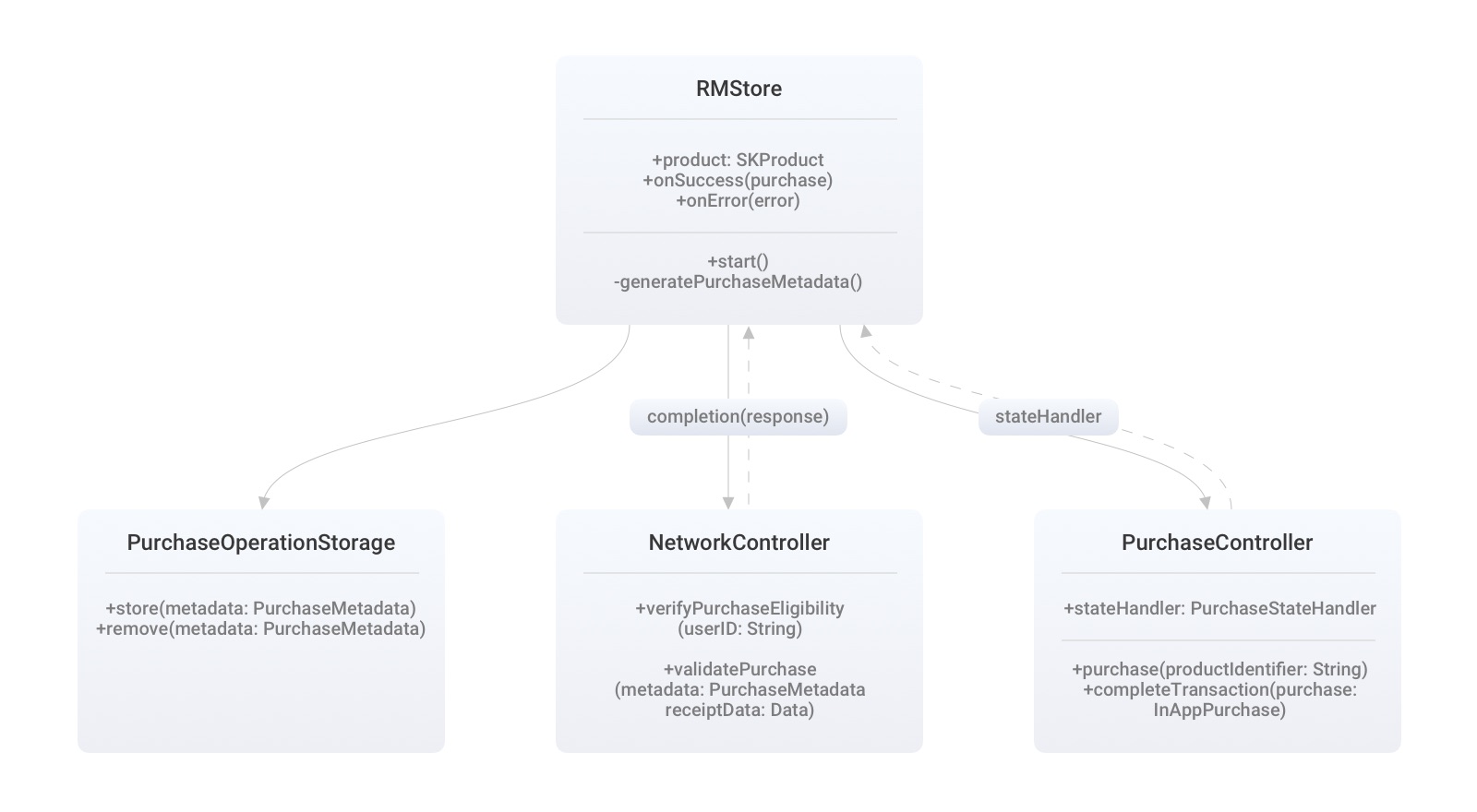
If failure happens before Apple charges, return the error immediately. If failure happens during server validation, retry steps 5–8 on next launch so users are not charged without credit.
Subscription validation patterns
For auto renewable subscriptions, entitlement checks usually run at cold start and after purchase. On one client project, remote validation via a third-party kit averaged roughly 3.1 seconds; local receipt parsing averaged roughly 1.3 seconds for finding an active entitlement. Local parsing unlocked faster UI decisions, while server validation still protected account-level access.
Filters that commonly decide “is subscribed” include purchase date, expiration date, cancellation date, and auto-renew status. Empty results mean the UI should present purchase or win-back messaging rather than premium content.
When subscriptions are mirrored in your own admin panel, keep product ID, price, and duration aligned with App Store Connect. A SubscriptionManager that owns all PurchaseController interaction — plus an isSandbox flag — keeps environment mistakes out of feature code. On each launch, decode the receipt, sync local purchases, compare with server entitlements, and cancel invalid rows through your API.
Choosing stack, partners, and budget around IAP
StoreKit IAP assumes a native Apple client surface. Cross-platform shells still call into native purchase plugins; evaluate that coupling when you pick app development technologies or hire for cross platform application development services. Pure native delivery remains the lowest-friction path for advanced subscription features and App Store Server integrations — which is why many teams keep IAP inside iOS app development services even when other screens share a multiplatform UI.
Regulated or wallet-like products should treat IAP as one monetization rail among others and involve fintech mobile app development constraints early. Budget planning belongs in the same conversation as catalog design; use a realistic cost to build an app model that includes receipt services, sandbox QA, and subscription support ops. If you outsource delivery, shortlist partners with StoreKit production references — not only UI portfolios — using a structured mobile app development outsourcing evaluation.
Final take
A durable ios developer in app purchase implementation is an operating system for entitlements: catalog, queue, validation, ledger, and support recovery. Start from Apple’s product types and guidelines, design for asynchronous StoreKit behavior, validate receipts with the right trust boundary, and finish transactions only after users actually receive what they paid for. Treat in app purchase ios edge cases — interrupted payments, restores, and failed server sync — as first-class product work, not QA afterthoughts.
DashDevs publishes PurchaseController so teams can reuse battle-tested building blocks, and we still customize orchestration per product — consumable balances, auto-renewable subscriptions, and hybrid catalogs each fail in different places. If you are consolidating monetization on iOS now, bring your product IDs, server entitlement model, and sandbox test plan to the first technical conversation.
Share article
